Lay your fabrics out, take a photo, and load it here. The checker shows the photo next to a grayscale copy and a copy reduced to 3, 4 or 5 value steps, so you can see at a glance which fabrics read as light, medium and dark. It runs entirely in your browser: the image is drawn on your own screen and is never uploaded, stored or sent anywhere.
Check your fabrics
The value checker needs JavaScript. Without it, take a photo with your phone's black-and-white or “mono” camera filter for the same effect.
Your photo never leaves your device. The page reads the file with your browser, draws it on a canvas on this page, and changes the pixels there. There's no upload button because there's nowhere for it to go: the checker has no server code. Close the tab and the image is gone. Large photos are shrunk to 900 pixels on the long side to keep things fast, which is plenty for judging value.
Value and color are two different things
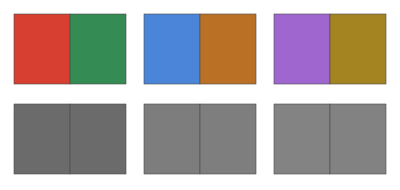
Color (hue) is red, blue, green. Value is how light or dark a fabric is, regardless of its color. A quilt pattern is drawn by value: the star shows because its points are darker or lighter than the background, not because they're red. Two fabrics in completely different colors can have the same value, and then the shape between them fades away when you step back from the quilt. That's the most common reason a block that looked good in the shop looks muddy on the design wall.
The trouble is that our eyes are good at seeing color differences and bad at judging value when color is in the way. Take the color away and the value is all that's left. That is what the grayscale view does.
How the checker works
Each pixel's brightness is worked out from its red, green and blue parts, weighted the way the eye sees them: 30% of the red, 59% of the green and 11% of the blue. Green counts most because the eye is most sensitive to it; blue counts least, which is why a bright royal blue turns surprisingly dark in grayscale. The grayscale view shows that brightness directly.
The value steps view rounds every pixel to the nearest of 3, 4 or 5 grays. With “evenly from black to white”, the range is cut into equal slices, so a light fabric lands in the light step whatever else is in the photo. With “by this photo”, the cut points move so each step covers about the same share of the picture. Use the second option when all your fabrics are fairly light or fairly dark and you want to sort them among themselves. The percentages under the picture show how much of the photo falls in each step.
The red filter view keeps only the red part of each pixel. It imitates the red plastic value finders sold for quilters. It works well on blues and greens, but it can't judge red, pink or orange fabrics, which all look pale through red. Use the grayscale view for those.
Taking a good photo
- Lay the fabrics flat or pin them on a design wall, side by side and touching, about as much of each as will show in the quilt. A tiny strip of a fabric reads differently from a big square of it.
- Use even daylight from a window, with no direct sun and no lamp shining on one end. A shadow across the pile makes the fabrics in it look darker than they are.
- Turn off the flash and stand straight over the fabrics so every piece gets the same light.
- Fill the frame with fabric. A white floor or a dark rug around the edges throws off the “by this photo” steps.
Reading the result
For most pieced quilts you want at least one clear light, one clear dark, and whatever mediums you like in between. If two fabrics that must contrast, such as star points and background, land in the same step, swap one of them. Fabrics in neighboring steps give a soft, blended look, which is what you want for a watercolor or ombré quilt and what you don't want for a sharp star.
- Log cabin blocks depend on a light half and a dark half; check every light against every dark. See the log cabin pattern.
- Half-square triangle quilts show their zigzag or pinwheel only when the two halves of each unit differ in value. The half-square triangle guide shows the layouts.
- Trip Around the World and bargello quilts are value gradients. Sort the fabrics from light to dark in grayscale, then cut. See the Trip Around the World and bargello patterns.
- Scrappy quilts can take a wide mix of colors as long as the values follow the plan.
Common mistakes
Judging value under a warm lamp at night. Lamplight changes how colors look; check in daylight, or take the photo in daylight and trust it.
Checking fabrics one at a time. Value is relative. A medium blue looks dark next to cream and light next to navy. Put every fabric for the quilt in one photo.
Reading busy prints by their darkest spots. A white fabric with a black print can read as a medium from across the room. The steps view works pixel by pixel, so a print can show up as speckles of two steps. Step back from the screen and judge the overall gray; that is what the quilt will show.
Trusting the red filter for red fabrics. It can't see them. Use grayscale.
Once the fabrics are chosen, the printable quilt planner has a fabric list with a box for a swatch, and the precut fabric guide explains how precut bundles are put together, which helps when a bundle has too many mediums.
You might also like
 How many squares from a fat quarter? Fabric yield calculatorHow many pieces you can cut from a fat quarter, precut or yard, and how many to buy.
 Hexagon template generatorTrue-size hexagon sheets for paper piecing, with a count and fabric calculator for rosettes and whole quilts.
 Dresden plate template generatorPrintable blade and center circle templates for any blade count and plate size, with fabric and a preview.
 Quilting measurement converterDecimals to fractions, inches to centimeters, yards to meters, and strips or yardage between fabric widths.