Calculator
Turn on JavaScript to use the calculator, or use the formulas below.
You can type fractions like 60 1/2 or decimals like 60.5. The starting numbers are the worked example from our guide to adding borders to a quilt, so you can check one against the other.
How the numbers work
Every border is cut half an inch wider than it finishes, for a quarter-inch seam on each long edge. The lengths depend on the corner style. Here W and L are the width and length of the quilt as it stands before that border, measured raw edge to raw edge, and b is the border’s finished width.
| Piece | Butted corners | Mitered corners |
|---|---|---|
| Strip width | b + ½ in | b + ½ in |
| Two side borders | L | L + 2b + 4 in |
| Top and bottom borders | W + 2b | W + 2b + 4 in |
| Quilt after the border | W + 2b by L + 2b | |
With several borders, each one starts from the size the quilt reached with the one before it, so the outer borders are longer. The calculator carries that forward for you.
Strip counts assume 40 usable inches across the fabric once the selvages are trimmed. The strips are joined end to end into one long strip, and the pieces are cut from it. A straight join uses half an inch of length; a diagonal join uses about one strip width. For butted borders the count also leaves 2 inches spare on each of the four pieces, so you can square the ends. Mitered lengths already carry 4 inches of spare.
Yardage is the number of strips times the strip width, plus 10% for straightening the fabric and the odd crooked cut, rounded up to the next eighth of a yard. If two borders come from the same fabric, add their strips together before you buy; the combined number may round to less.
Butted or mitered
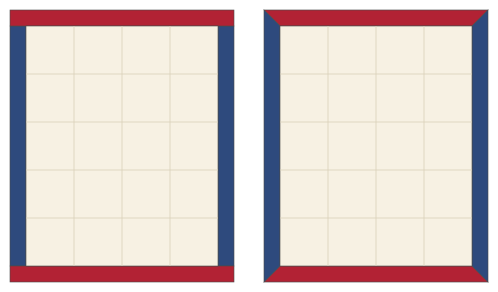
Butted borders are the default for good reason: they take less fabric and are hard to get wrong. Sew the two side borders on, press, then measure the width again through the center and cut the top and bottom borders to that number. The calculator’s top and bottom lengths are what the math says; your seam may make the real number an eighth off, and the real number wins.
Mitered corners suit a stripe, a printed border design, or several borders that should turn the corner like a picture frame. Each strip runs past the corner by a little more than its own width, and the two strips meet on a 45-degree seam. When you have several mitered borders, you can either miter each one as it goes on, which is what the table shows, or sew all the strips for one side together into a band and miter the whole band at once. For the band method every strip in it is cut to the outermost length, which the calculator lists under the table.
Cutting borders along the length
A border cut along the lengthwise grain, parallel to the selvage, has no joins and stretches less. It needs a piece of fabric as long as the longest strip, which is why it uses more yardage on narrow borders and is worth it on wide or directional ones. The calculator lists that yardage when four strips fit across the fabric. It is a good choice for the outer border of a bed quilt, where a join would land in the middle of a long, plain edge.
Mistakes that cause wavy borders
- Measuring along the edge instead of through the center. The edges have stretched; the center hasn’t. Cut to the center number and ease the edge to fit.
- Cutting the top and bottom before the sides are sewn. With butted corners, always measure again after the side borders are on.
- Sewing a border on without pinning. Match the centers and the ends first, then pin every 4 to 6 inches, easing any fullness between pins.
- Forgetting the borders change the quilt’s size for the backing and binding. Use the finished size in the last column for those.
Related tools and guides
For the sewing itself, including how to mark and stitch a mitered corner, see how to add borders to a quilt, and how to square up a quilt before you measure. If your blocks are separated by strips, the sashing calculator gives the size of the top before borders. Blocks set on point need the setting triangle calculator first. Once the borders are on, StitchTested’s binding and backing calculator takes it from there, and its quilt size chart helps you pick border widths that reach a standard bed size.
You might also like
 Panel quilt border calculatorBorder widths to take a fabric panel to a target size, strip lengths in sewing order, and border and binding yardage.
 How to add borders to a quiltMeasuring through the center, butted and mitered corners, and border strip math with a worked example.
 Quilt sashing calculatorEvery sashing strip and cornerstone to cut, with yardage for each.
 How many squares from a fat quarter? Fabric yield calculatorHow many pieces you can cut from a fat quarter, precut or yard, and how many to buy.